Everything it does, in plain words
Manpower Ledger is software for manpower supply and labour supply companies in the UAE. It does three things fully: timesheets, salaries and workers' documents. This is all of it, with real screens from the demo, and with what it leaves alone at the end.

Timesheets
One grid for each site and month: a row for each worker, a column for each day. Five ways to fill it, and checks before a single hour counts.
- A photo or a scan, read by AI
- Upload a photo of the supervisor's attendance sheet, or a scan saved as a picture. It is read twice, the two readings are compared, and every box where they differ is marked for your staff. In our own tests on sample sheets, 99 boxes in 100 were read correctly.
- An Excel timesheet, read exactly
- An Excel timesheet in your company's own layout is read as it is. There is no AI and no guessing here. That layout is set up with your system; any other sheet is pasted into the grid.
- Pasted from Excel
- Copy the hours in your own spreadsheet and paste them into the grid.
- Typed in
- Type the hours straight into the grid, on a computer or on a phone. The AI saves time; it is never a condition.
- Sent by email
- Your company gets its own timesheets address, set up with your system. A supervisor's email with the sheet attached is sent or forwarded there, and the file waits on the Timesheets page for your staff.
- Checks before approval
- A worker with hours at two sites on the same day. A row that does not add up to the total written on the sheet. A worker with no hours at all. Each is pointed out before anyone approves.
- The sheet stays beside the hours
- The photo of the sheet is kept with the timesheet, so anyone can check a figure against the paper months later.
- Approved by a person
- Nothing counts for salary until one of your people has looked and approved the timesheet.
- A printout for your customer
- The approved timesheet prints with the hours, the rate and the amount, and with VAT for the customers you charge it to. It is the proof that goes with your bill.

Payroll
Hours times the worker's rate, less absent deductions and advances. Every figure can be opened to see where it came from.
- Salary from approved hours
- The hours come only from approved timesheets. Nobody types them a second time, so nobody can type them wrong a second time.
- One page for the month
- The owner sees the steps of the salary run on one page, and how the total was reached, before anything is paid.
- Where a figure came from
- For any worker: the sites, the days and the hours behind the salary, down to the timesheet.
- Absent deductions
- The system shows who was absent and on which days. Whether a deduction is taken, and how much, is your decision, worker by worker.
- Advances
- An advance is written down on the day it is given and taken back from the salary, so that no worker is paid twice and nothing is forgotten.
- Bank and cash
- Each worker's salary can be split between the bank file and cash. How every amount was paid is on record.
- The owner's approval
- The manager prepares the month; only the owner approves it. After approval the month is locked, and only the owner can open it again.
- The bank salary file
- Made on approval, for paying through the Wage Protection System (WPS). Today it comes as the Excel sheet that one of the UAE's large exchange houses asks for; the layout of your own bank or exchange house is set up before your first salary month. A setting says how a salary is split into fixed and variable.
- Payslips
- For every worker of the month, two to a page, or for one worker. Print them or save them as PDF.
- Salary sheet, cash sheet, register
- The salary sheet for your records, a cash sheet for the workers paid in cash to sign, and a register of the month.
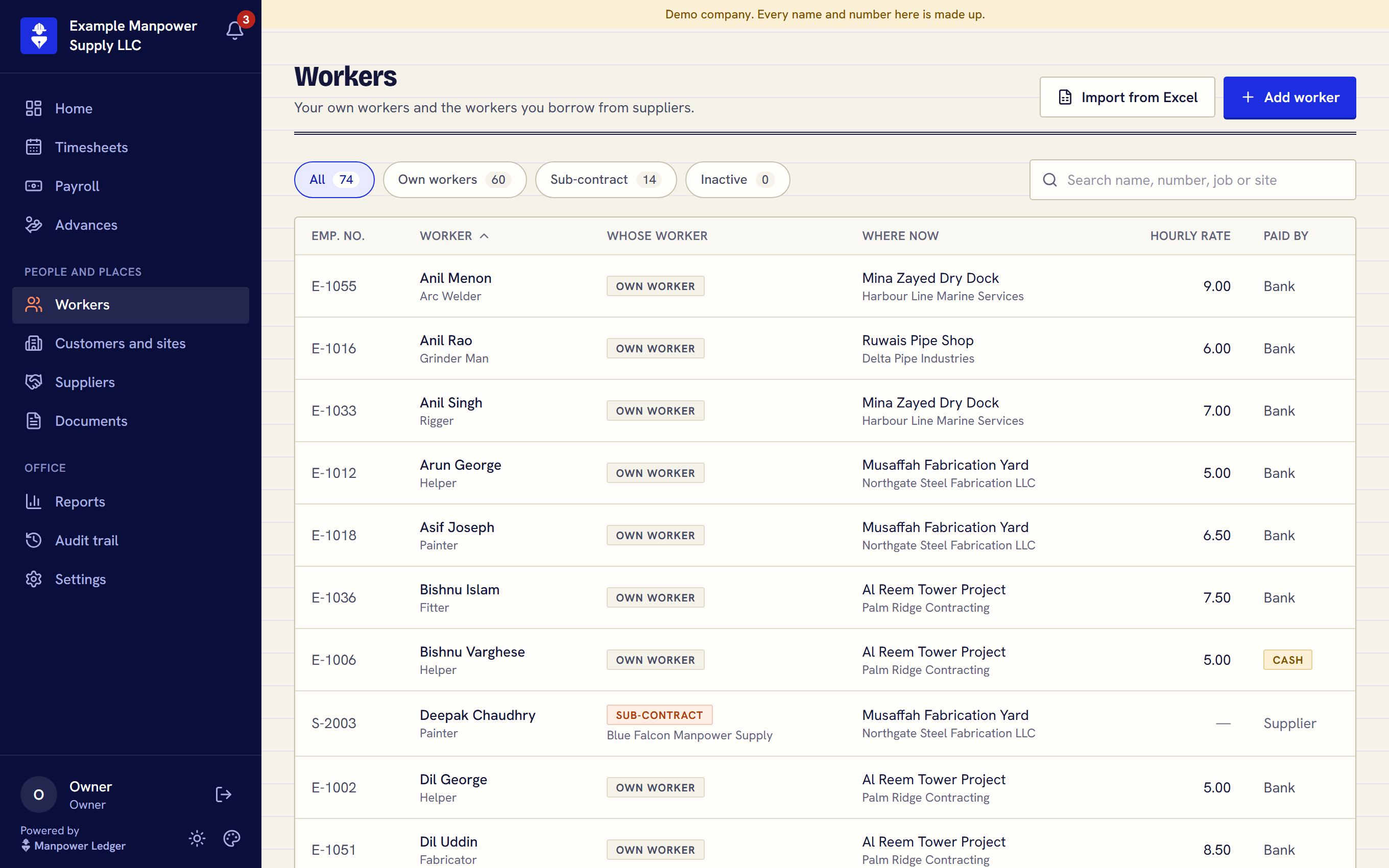
People and sites
Who works for you, who you borrowed, and where each of them is this month.
- Your own workers
- Each with a designation, an hourly rate, the labour card and account details the salary file needs, and whether the salary goes through the bank or in cash.
- Sub-contract workers and suppliers
- Workers you take from another manpower company. Their hours and documents are kept like anyone's; no salary is worked out for them, because their own company pays them.
- Customers and sites
- Each customer, each of its sites, and who works where. A customer's timesheet can run over the calendar month or over its own period, such as the 26th to the 25th.
- Charge rates
- What you charge a customer for an hour of a worker, set when the worker is put at that customer's site. It is optional, and VAT is switched on or off for each customer.
- Import from Excel
- Bring your list of your own workers in from an Excel file instead of typing it.

Documents
Passports, visas, Emirates IDs and labour cards expire quietly. Here they do not.
- Every worker's papers
- Each document is kept with its number and its expiry date, on the worker's own page.
- Many uploaded at once
- Choose or drop up to 50 pictures of documents at a time. AI fills in the kind of document, the number and the dates, and a person checks them.
- A list every Monday
- Once email is set up with your system, owners and managers get one email on Monday morning with what has expired and what is about to.
- A warning in time
- The list is sent again on the day a document is 7 days from its date, and once more when it is 1 day away.
- On every screen
- The bell at the top shows what needs attention now, and the expiring documents report lists them all.
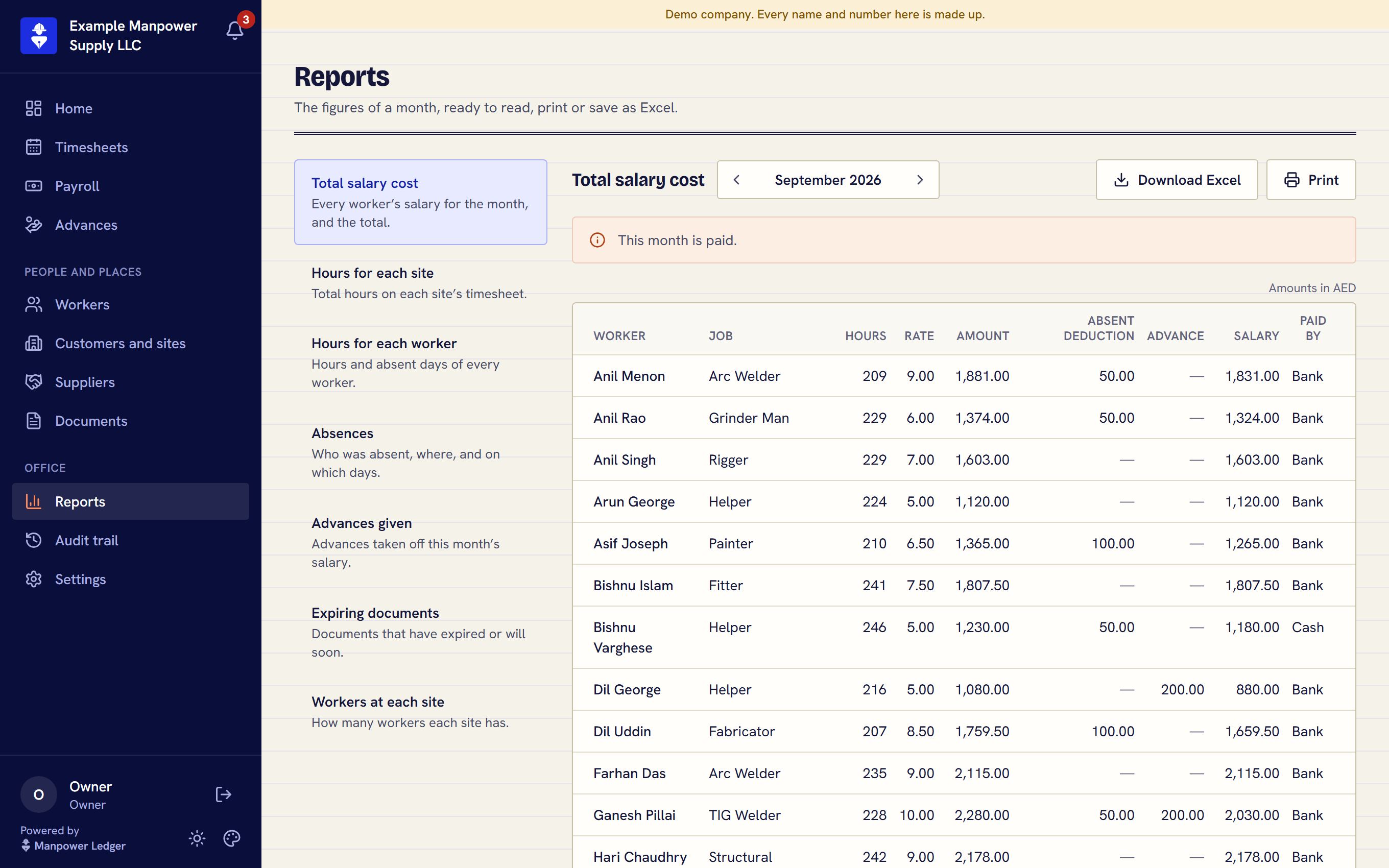
Reports
Seven reports, each ready to read, print or save as Excel.
- Total salary cost
- Every worker's salary for the month, and the total.
- Hours for each site
- The total hours on each site's timesheet.
- Hours for each worker
- The hours and the absent days of every worker.
- Absences
- Who was absent, where, and on which days.
- Advances given
- The advances taken back from this month's salaries.
- Expiring documents
- What has run out and what will soon.
- Workers at each site
- How many workers each site has.
- All your records, any time
- One download gives you every record the system holds for your company, as one file. The scanned files are listed in it, and we hand them over when you ask. Your data is yours.
Control and safety
Salaries, passports and bank details are the most private things an office holds. Who sees what is decided by the server, not by the screen.
- Three roles
- Owner, manager and office staff. Office staff work with timesheets and documents and are never sent a pay rate or a salary, so there is nothing on their screen to uncover.
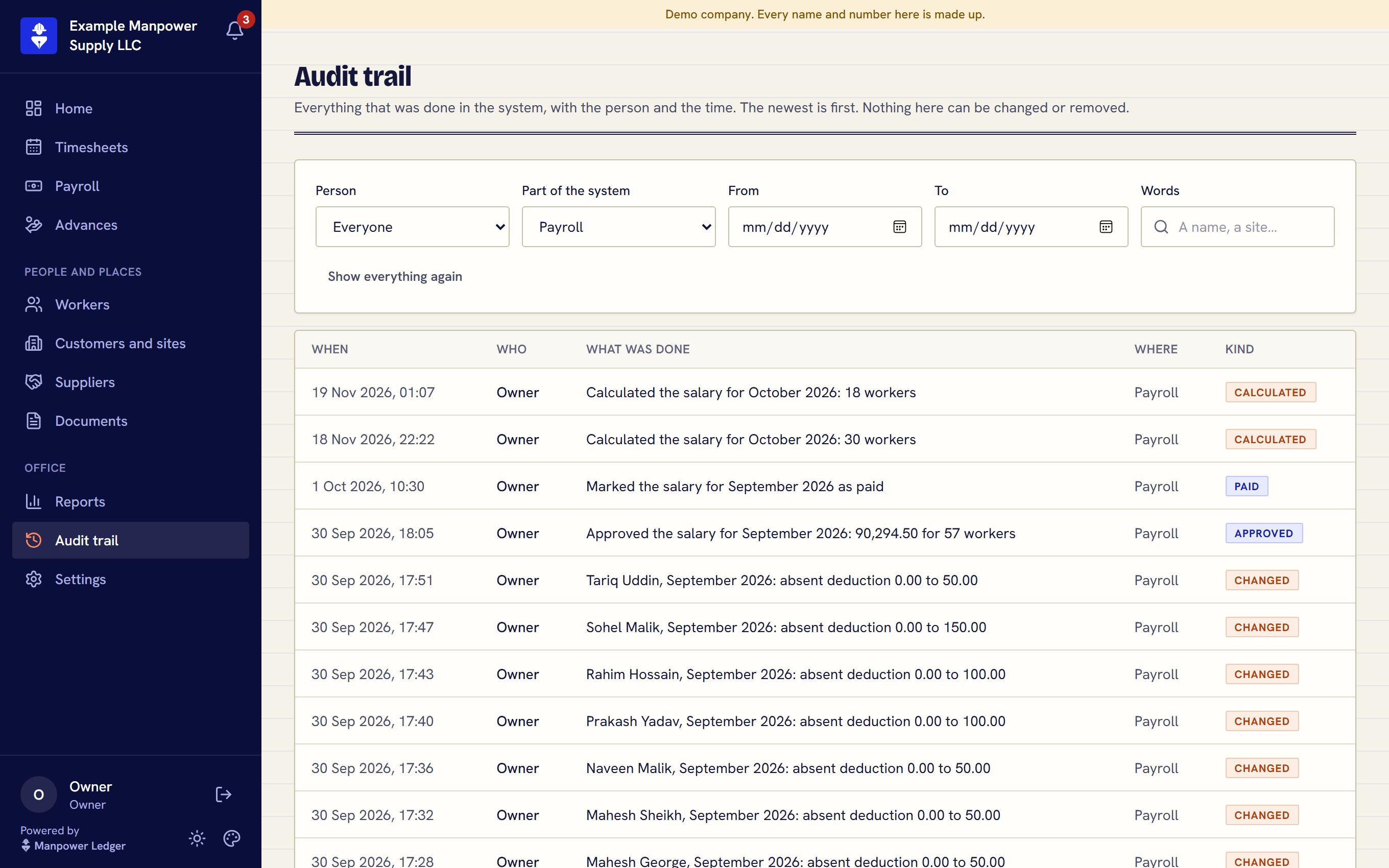
- An audit trail
- What was added, changed, approved, uploaded or downloaded, by whom and when, on one page for the owner and the manager. Single hours typed into a draft are not listed one by one; the approval of the timesheet is.
- Alerts
- A bell on every screen: a site with no timesheet yet, a timesheet waiting for approval, a month ready for its salary run, a document about to expire.
- A sign-in code by email
- Once email is set up and the owner switches it on, signing in on a new device needs a code sent by email. A stolen password alone then opens nothing.
- A database of your own
- Your company's data does not sit in a shared table with anyone else's. Each business has its own database and its own file storage.
- A backup every hour
- A copy of the whole database, in separate storage. No copy can be deleted or overwritten in its first 7 days, and one copy a day is kept for 90 days.
- Encrypted, and private
- Every connection is encrypted. A passport scan or a timesheet opens only for someone signed in to your company.
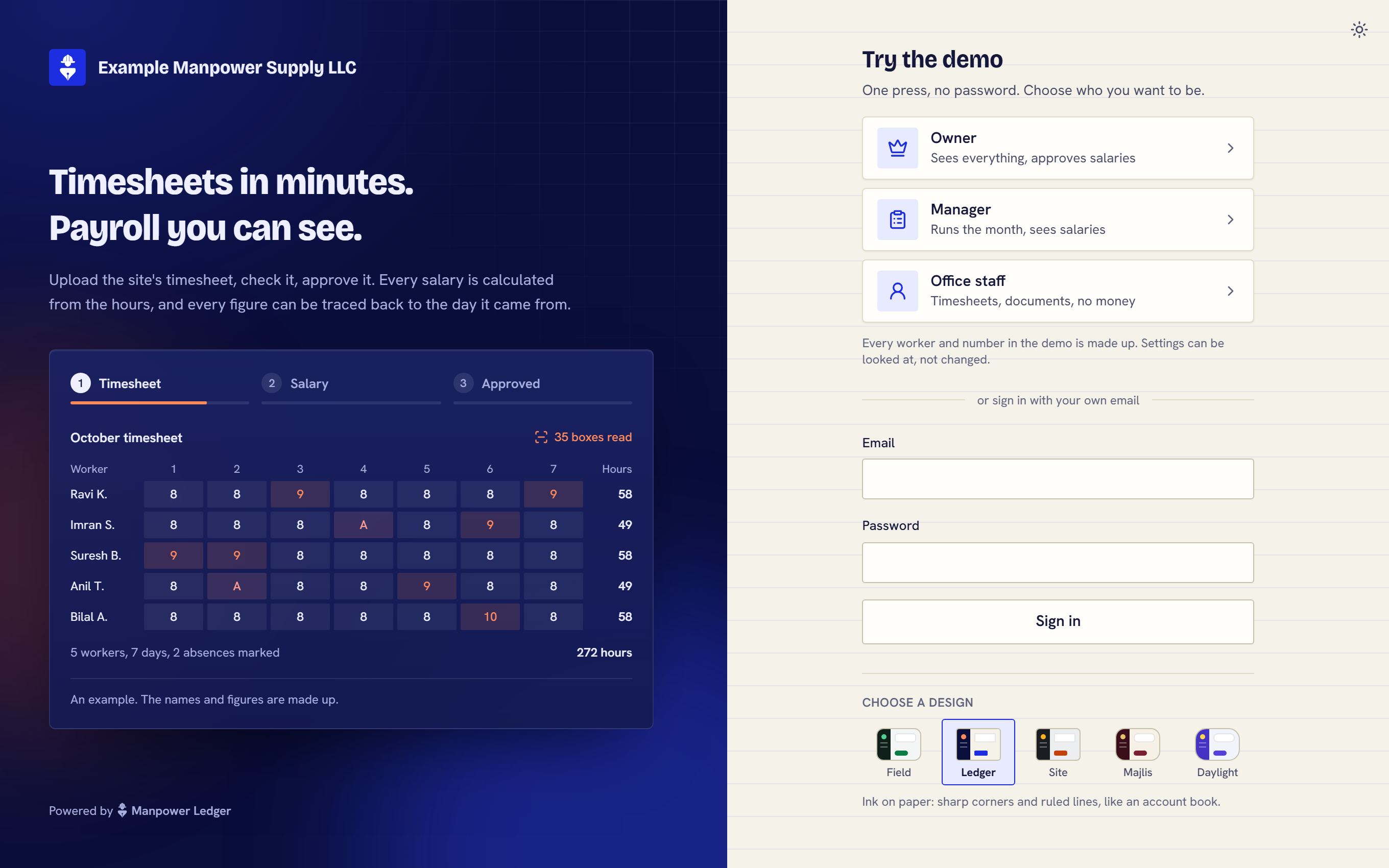
Made yours
You do not get a seat in someone else's system. You get your own, set up by us, and changed when your work asks for it.
- Your name, your logo, your address
- Your people sign in at an address of your own, such as yourcompany.manpowerledger.com, under your own logo. We stay in the small print.
- Your design
- Five designs to choose from: Field, Ledger, Site, Majlis and Daylight. Each changes the typeface, the corners, the menu and the page, and we set your system up in the one you choose. If you want your own colours in it, we make that for you. Each person can also switch between a light and a dark screen.
- We move you in
- We bring your workers in from your Excel list and enter your customers, sites and rates for you. You start with your own data, not an empty screen.
- Your bank's layout
- The salary file is built in the layout of your bank or exchange house before your first salary month.
- Changes built for you
- Out of the box, every approved hour is paid at the worker's one hourly rate, and there are seven reports. If you pay overtime, rest days or holidays differently, or need a report or a field of your own, we build it into your system. You are told what a change involves before any work starts.
- Runs everywhere
- In the browser, on a phone, a tablet, a laptop or a wide monitor. There is nothing to install, and every screen is checked at eight sizes.
What it leaves alone
It does not try to be everything. Better to say so here than in the middle of a demo.
- Your accounting
- It does not replace your accounting software, and it does not issue your invoices to customers. It gives you the approved hours and amounts to bill from.
- Your workers' phones
- There is no app and no login for workers or for sub-contractors. Only your office uses the system.
- Attendance machines
- It does not read fingerprint devices, face scanners or GPS. It works from the sheet your site supervisor already signs.
- Legal advice
- It records how each salary was worked out and paid, and it hides nothing. How you pay is your decision and your responsibility.
See it with your own timesheet
Send us one sheet from one of your sites. In a short call we show you your own hours, read and worked out into salaries.
Book a demo